Google Calendar now displays three time zones simultaneously, streamlining scheduling for global teams and individuals alike.
New Three-Time Zone Support
Transforming Scheduling for Global Teams
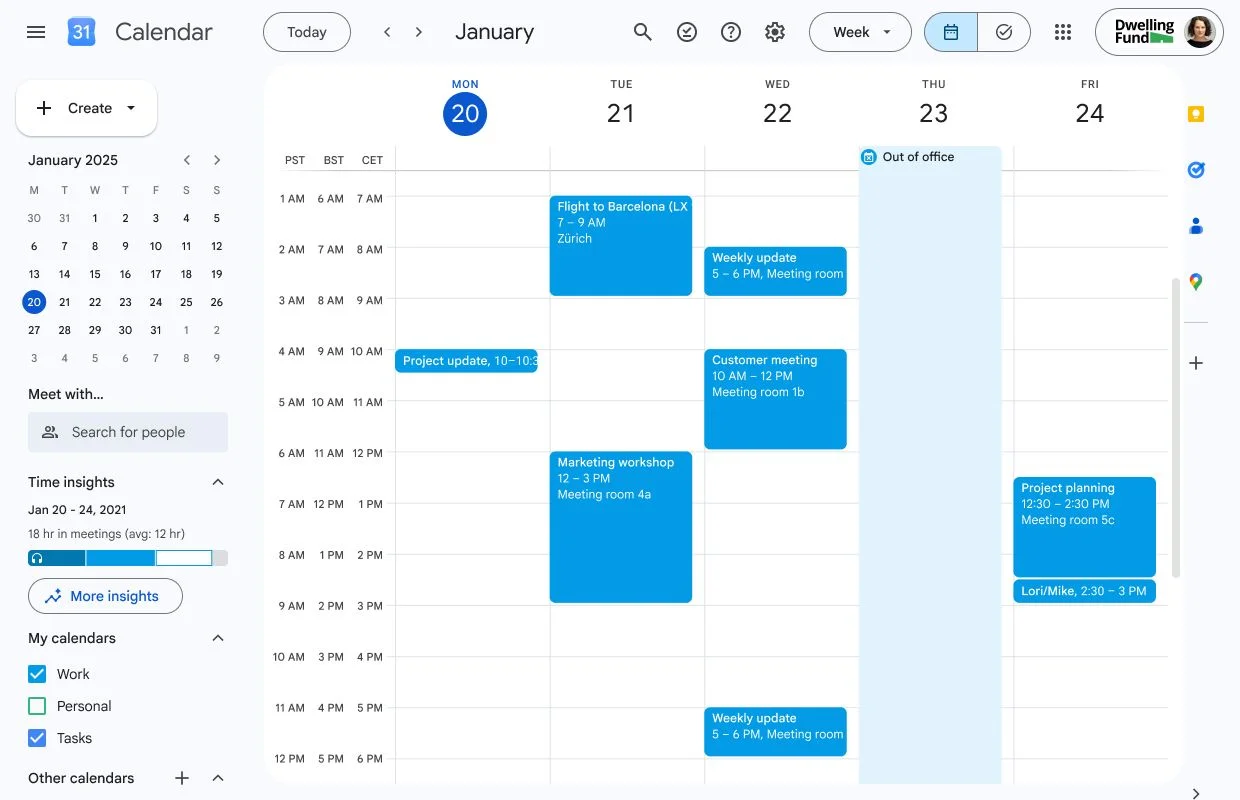
Google Calendar has recently made a significant upgrade to its web version, introducing support for displaying three time zones simultaneously. This enhancement represents a meaningful shift in how international teams coordinate scheduling, eliminating the common miscommunications that arise from time zone discrepancies. Now, users can easily visualize multiple time zones side by side in Day, Week, and Custom multi-day views, creating a more user-friendly experience when organizing meetings.
As businesses increasingly adopt hybrid and remote work environments, the need for efficient scheduling tools has never been more pronounced. It's a pain point many professionals experience: coordinating meetings with colleagues, clients, or partners situated across different geographical regions can be a logistical nightmare. The old approach, which only allowed for two time zones to be displayed at once, often left users with the burden of manually calculating time differences. That's not just inconvenient; it’s inefficient.
The Importance of Time Zones in a Global Workplace
This upgrade, which began rolling out on September 25, marks a response to the increasing globalization of the workforce. With teams scattered across the globe, spanning cities like San Francisco, New York, and Zurich, understanding the time differences is critical. One misaligned meeting can lead to frustration or lost opportunities. By allowing users to view three time zones simultaneously, Google Calendar is addressing a frequent roadblock in professional interactions. Users now have the capability to differentiate between locations at a glance, potentially reducing the number of scheduling conflicts.
The integration of this feature into the Find a Time scheduling screen adds another layer of convenience. When setting up events, users can quickly reference the time zones relevant to their participants, which streamlines the process considerably. Instead of flipping between clocks or separate apps, everything needed for joint efforts is consolidated in one easy-to-assess format.
Customizable Time Zones for Enhanced Clarity
Customization plays a vital role in making this feature user-friendly. Among the standout improvements is the ability for users to assign distinct labels to each time zone. So rather than merely seeing time zone names, users can opt for identifiers like SFO (San Francisco), NYC (New York City), or ZRH (Zurich). This personalization enhances clarity when quickly scanning schedules or planning meetings, allowing for easier identification of participants' locations. If you’re working in this space, you know how critical quick recognition can be, especially under tight deadlines.
But there's more. The ability to label time zones offers a practical approach to the often-overlooked aspect of communication in international teams. Misunderstandings can arise purely from vague time zone references, and adding recognizable city codes helps mitigate this risk.
Revamped Time-Zone Picker for Ease of Use
Alongside the introduction of three time zone support, Google has made notable changes to its time-zone picker tool. This critical component now allows users to search for a city or country, rather than manually sifting through an extensive list of time zones. This update, also initiated on September 25, empowers users to configure their time zones independently, making the process more fluid and user-oriented.
The new functionality is particularly beneficial for users who need to set up meetings across multiple time zones with little prep time. With a click or a simple search, users can pinpoint the correct time zone based on their own geographical location or the location of their counterparts, further eliminating the headaches associated with scheduling.
Rollout and User Accessibility
The rapid rollout means that a significant number of users might notice these features within about 15 days, while those utilizing Scheduled Release domains can expect to see substantive changes from October 12. It’s a strategy that Google often employs, introducing updates progressively to manage potential issues and ensure a smoother transition for users. Though such rapid iterations can be beneficial, they sometimes lead to inconsistencies in user experiences, as not everyone will receive the updates at the same time.
Implications and Future Outlook
This three-time zone capability is more significant than it looks on paper. As remote work and global collaboration become entrenched in corporate culture, tools that enhance communication and efficiency will likely gather traction. Google Calendar is positioning itself as a key player in this arena, offering solutions that address real-world challenges faced by professionals. You might see other platforms following suit, as having intuitive scheduling capabilities can be a differentiator in user engagement and retention.
So, what’s next? If you're relying on Google Calendar for your scheduling needs, you can expect further enhancements to streamline your productivity. You might find that this particular update could set off a chain reaction, prompting similar platforms to expand their time management features. The simple act of making international collaboration easier can have profound effects on how organizations operate within increasingly global markets.
As communication tools evolve, users will continue to seek out features that promote clarity and efficiency. This update addresses that need directly—providing a more tailored experience that reflects the complexities of today's interconnected work environments. Ultimately, the focus remains on simplifying the planning process for users who operate across time zones, streamlining the challenges presented by a digital, global workforce.



Discussion
Sign in to join the discussion.